Objects
The Objects section covers things the vehicle spawns and carries - boat chairs, deck lighting, a storage box - and, for boats, the points a Zoi steps off onto.
These are not mesh slots. Each entry says "spawn this object and attach it here", so unlike meshes you can add and remove them.
01. Cars and boats seat people differently
This is the single most important thing to understand before editing a boat, and it explains why the Seats section disappears for them.
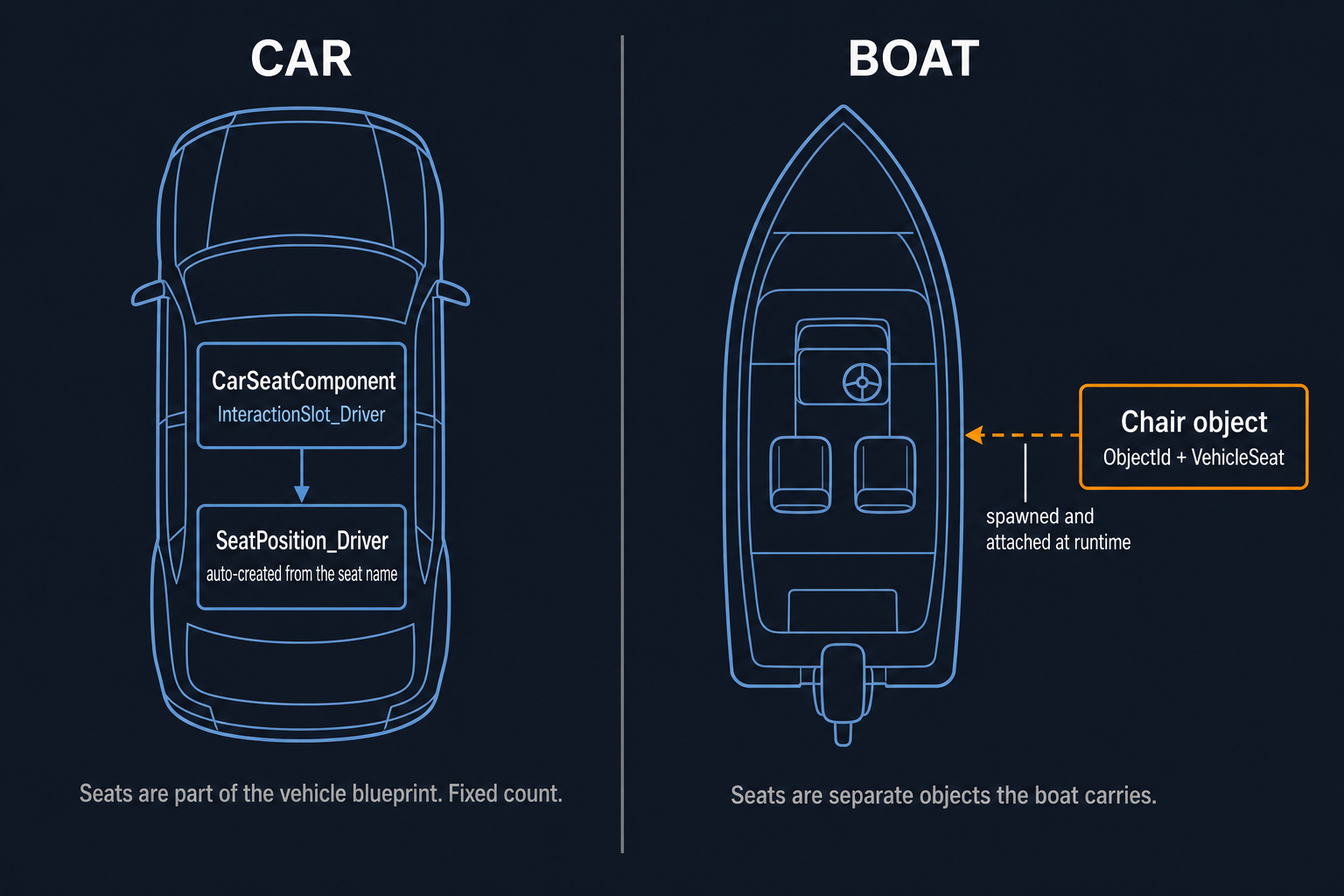
A car seat is part of the vehicle itself. It arrives with the vehicle, and where a Zoi sits is built in.
A boat seat is a separate object the boat carries. The chair has its own definition, its own mesh and its own sit spot; the boat only records which ride slot that chair serves.
The practical consequences:
| Car | Boat | |
|---|---|---|
| Add a seat | Not possible here | Possible, within limits |
| Seat lives in | Seats section | Objects section, Seat Objects |
| Sit position | Built into the vehicle | Comes from the chair object |
| Disembark point | Not used | Objects section, Disembark Points |
02. Seat Objects
Entries whose Vehicle Seat is set. They are the boat's chairs.
The group is fixed size, and both Component Name and
Vehicle Seat are read-only, because the game matches a chair to its
seat by exactly those two values.
Seat objects are hidden on vehicles that have real seats - a car never treats a carried object as a seat, so the entry would be inert data.
Adding a seat to a boat takes two changes, and doing only one fails:
- A chair object bound to a free ride slot.
- Room in the vehicle template's seat count.
Without the count, the slot does not exist and nobody can board. Without the chair, there is nothing to sit on. The ceiling is seven - a driver plus six passengers.
| Boat | Seats used | Spare |
|---|---|---|
| Sail boat | 7 | 0 |
| Speed boat | 2 | 5 |
The seat count itself is not editable in this workspace. It lives in the vehicle template, as MaxSeatNum.
03. Owned Objects
Everything whose Vehicle Seat is not set: lighting, storage boxes, decoration. Add, remove and rename these freely.
Vehicle Seat is hidden here on purpose, so a plain object can never be
mistaken for a seat. Nothing in the game looks a plain carried object up
by name, so call it whatever helps you - or leave Component Name blank
and one is generated. A name already used by another component is
rejected rather than overwriting it.
Object ID must name a row in the Object table. If it does not, the game skips that object without complaining and you are left wondering why nothing appeared. Because that failure is silent, turning on Show Placement Markers also checks every id and tells you which ones would fail.
The check confirms the row exists. It cannot promise the object will spawn - an object can still bail for reasons of its own - but a bad id is by far the most common cause.
Positions are relative to the vehicle root, not to whatever the object sits near. The panel, the preview and the game all use that same frame, so a value you set here is the value the game uses.
04. What the preview can and cannot show
ModKit does not ship the game's object art, so it cannot always show you the real thing. Where it can, it builds the object out of its meshes and attaches it; where it cannot, it drops a position marker instead.
| What you are placing | What the preview shows |
|---|---|
| An object from your own mod | The real thing |
| An ordinary game object, such as a chair | The real thing |
| The boat's own built-in chairs | A marker |
When a slot falls back to a marker, the toast tells you why, so you can tell "the id is wrong" apart from "ModKit does not have that art".
Every entry has a Pick button that selects the component in the preview viewport, so you can place it with the gizmo rather than typing coordinates.
05. Disembark Points
Where a Zoi is placed after stepping off. Boats only - nothing else reads them - so the group is hidden on other vehicle types.
Only the location matters. Names are ignored, so call them whatever helps you, or leave the field blank for a generated one. Add and remove freely.
Put them somewhere a Zoi can plausibly stand: on the deck near an edge, not inside the hull and not out over the water.
06. Common issues and fixes
| Issue | Cause | Fix |
|---|---|---|
| Object never appears in game | Object ID does not exist | Turn on Show Placement Markers to have every id checked |
| Object appears in the wrong place | Position measured from a part rather than the vehicle root | Values here are root-relative |
| Object shows as a marker in the preview | ModKit has no art for it | Expected for built-in boat chairs; it still spawns in game |
| Added a chair but nobody can sit | Seat count has no room | Seat count lives in the vehicle template |
| No Seat Objects or Disembark Points group | The vehicle is not a boat | Expected - both are boat-only |
| Renamed an entry and it was ignored | Name already used by another component | Pick a different name, or leave it blank |
07. Chapter summary
| Checklist | Done |
|---|---|
| Did Show Placement Markers report every id as valid? | ✅ |
| Are carried objects positioned relative to the vehicle root? | ✅ |
| For a boat, do disembark points sit somewhere standable? | ✅ |
| If I added a chair, is there room in the seat count? | ✅ |
08. What the MCP tools cover
| Tool | Use |
|---|---|
modkit_list_vehicle_components | Returns seat_objects, owned_objects (each with object_id and vehicle_seat) and disembark_points. |
modkit_set_vehicle_component_transform | Move any of them. Carried objects are positioned relative to the vehicle root, the same frame the game reads. |
Adding and removing entries is editor-only.
09. Data reference
- Object - the table an Object ID has to appear in.
- VehicleTemplate - where the seat count lives.
- FB1VehicleAssetDescription - dimensions and
MaxSeatNum.